You spent hours creating a great digital product. You upload it, hit submit, and get a rejection email. Frustrating, right? The good news is that almost every rejection comes from a small set of avoidable mistakes: a messy title, a bad thumbnail, a copyrighted file, or personal information left inside the product.
Large marketplaces like Amazon have spent years refining their listing standards, and the core ideas (clear titles, honest descriptions, clean images, original content) apply to every marketplace, including digital ones. In this guide we take those proven principles and adapt them to digital products on CraftedDocs: notes, templates, spreadsheets, presentations and more. Follow this checklist and your listing has the best possible chance of approval on the first attempt.
Read this guide once, then use the checklist at the end before every submission. Sellers who check their listing against a list before submitting get approved faster and spend less time on resubmissions.
Why Listings Get Rejected: The Big Picture
A listing review looks at four things: what you say (title and description), what you show (thumbnail, images and preview), what you deliver (the actual file), and whether it is safe and legal (copyright, personal data, prohibited content). A problem in any one area can cause rejection.
| Review Area | What Reviewers Look For | Most Common Failure |
|---|---|---|
| Title and brand | Clear, accurate, searchable | Keyword stuffing, ALL CAPS, fake claims |
| Description | Honest, complete, matches the file | Too short, misleading, contact details inside |
| Thumbnail and images | Clean, sharp, relevant | Blurry, stolen images, watermarks, phone numbers |
| Product file | Opens properly, readable, original | Corrupt file, scanned book, empty pages |
| Legal and privacy | Original work, no personal data | Copyrighted material, personal information left in file |
Part 1: Title Rules
Your title is the first thing a buyer and a reviewer see. Marketplaces such as Amazon require titles to be accurate, readable and free of promotional clutter. The same logic applies to your digital listing.
Title Do's
- Lead with what the product is. Example: "NEET Biology Handwritten Notes PDF: Human Physiology (Class 11)".
- Include the key details a buyer searches for: subject, exam or course, class or semester, file format, and year if relevant.
- Use title case or normal sentence case. Capitalise the first letter of main words, as in a book title.
- Keep it readable. We recommend staying under about 100 characters so it displays fully in search results and on mobile.
- Use numerals for quantities: "50 Pages", "12 Chapters", "5 Templates".
- Match the title to the file. If the title says "Complete Semester 3 Notes", the file must actually cover the whole semester.
Title Don'ts
- Do not use ALL CAPS. "BEST NEET NOTES" looks like spam and is a common reason for rejection.
- Do not use promotional phrases: "Best Seller", "Number 1", "Guaranteed 650+", "100% Selection", "Free Shipping", "Hot Deal".
- Do not add special characters for decoration: avoid ★ ✔ ❤ !!! $$$ ### and emoji in the title.
- Do not repeat the same keyword again and again. "NEET notes NEET PDF NEET biology NEET download" is keyword stuffing.
- Do not put your name, phone number, WhatsApp, Telegram, Instagram or email in the title.
- Do not use another brand or coaching institute name unless you own it. Writing "Allen Notes" or "Aakash Module" in a title without rights is a trademark and copyright risk.
- Do not mention price or discounts in the title. Use the price field and coupon feature instead.
| ❌ Likely to Be Rejected | ✅ Likely to Be Approved |
|---|---|
| BEST NEET NOTES!!! 100% SELECTION GUARANTEE ★★★ | NEET Biology Handwritten Notes PDF: Chapter-Wise, Class 11 and 12 |
| Allen Aakash Leaked Module PDF Free WhatsApp 98XXXXXXXX | NEET Physics Formula Sheet PDF: Short Notes for Revision |
| resume resume template resume cv fresher resume best resume | ATS-Friendly Fresher Resume Template in Word (DOCX), India |
| Excel Sheet Cheap Offer Today Only | GST Invoice Template Excel (XLSX) with Auto Tax Calculation |
Part 2: Brand and Seller Name Rules
On Amazon, the brand field must reflect the real brand of the product. For digital products the equivalent is your seller name, store name and any brand name you print inside your files.
Do
- Use your own real name, a genuine store name, or a brand you actually own.
- Use the same brand name consistently across your profile, listings and product files.
- Choose a short, professional store name that is easy to remember.
Don't
- Do not use a famous brand, institute, publisher or person's name to look official. That is impersonation.
- Do not claim to be "official", "authorised" or "verified" unless the platform has given you that badge.
- Do not use your store name as a vehicle for phone numbers or social media handles (for example "NotesKing Call 98XXXXXXXX").
- Do not copy another seller's store name or logo.
Part 3: Description Rules
Amazon expects product descriptions to be accurate, specific and free of external promotion. Your description should help a buyer decide quickly and match exactly what they receive.
What a Good Description Includes
- What it is: one clear opening sentence.
- Who it is for: exam, class, semester, profession or skill level.
- What is inside: number of pages, chapters, sheets, slides or templates.
- File details: format (PDF, DOCX, XLSX, PPTX, ZIP), file size and language.
- How to use it: the software needed and any setup steps.
- What is NOT included: be honest about limits. This prevents refund requests and bad reviews.
- Last updated: the year or syllabus version covered.
Description Do's
- Write in simple, clear sentences. Short paragraphs and bullet points are easier to scan.
- Use real numbers: "62 pages, 14 chapters, 40 diagrams".
- Be specific about the syllabus: "Based on NCERT 2025-26 edition".
- Describe only what is in the file. If it is not in the product, do not mention it.
- Proofread. Spelling and grammar errors reduce trust and can trigger quality review.
Description Don'ts
- Do not make guaranteed result claims: "You will score 650+", "Guaranteed rank", "Get a job in 7 days".
- Do not make false comparisons or attack others: "Better than Allen notes", "Other sellers are fake".
- Do not include contact details or off-platform links: phone numbers, WhatsApp, Telegram, Instagram, email addresses or links asking buyers to purchase elsewhere.
- Do not include health, medical, legal or financial claims that promise outcomes you cannot prove.
- Do not copy and paste descriptions from other websites or sellers. Duplicate content is flagged.
- Do not stuff keywords in a block at the bottom of the description.
- Do not use misleading urgency: "Only 2 left", "Offer ends tonight". Digital files have no stock limit.
Write your description as if you were answering a buyer's questions before they ask: "Will this work on my phone?", "Is it handwritten or typed?", "Which edition?". A description that answers these gets approved and also converts better.
Part 4: Thumbnail and Image Rules
Amazon is strict about main images: sharp, well-lit, accurately representing the product, no misleading graphics. For digital products, your thumbnail is a picture of the cover or a sample page of what the buyer will receive.
Thumbnail Do's
- Show the real product. Use a cover page, a genuine sample page or a mockup of your actual file.
- Use high resolution. We recommend at least 1000 pixels on the longer side so it stays sharp and zoomable.
- Keep a clean, uncluttered layout with a plain or simple background and good contrast.
- Make text readable at small size. Many buyers will see it as a small card on a phone.
- Use a consistent size and ratio across your listings so your store looks professional.
- Use only images you own or have the right to use: your own design, your own photos, or properly licensed stock.
- Crop properly. Remove desk clutter, fingers, shadows and the edges of the table when photographing handwritten pages.
Thumbnail Don'ts
- No blurry, pixelated, stretched or very dark images.
- No stolen images. Do not take thumbnails from Google, Pinterest, other sellers, coaching websites or YouTube.
- No third-party logos or brand marks (coaching institutes, publishers, universities) that you do not own.
- No phone numbers, email, QR codes to outside payment, or social media handles on any image.
- No misleading badges or claims such as "Topper Verified", "Official", "Free", "50% OFF" or "Bestseller" painted onto the image.
- No screenshots of other marketplaces, other sellers' reviews or fake testimonials.
- No offensive, adult or violent imagery in any picture.
- No images of real people without their permission, especially students, minors or toppers.
| Image Element | Recommended | Avoid |
|---|---|---|
| Size | 1000 px or more on the long side | Small or low-resolution images |
| Background | Plain, light, high contrast | Busy patterns, cluttered desks |
| Text on image | Short product name and subject only | Paragraphs, offers, contact details |
| Content | Real cover or real sample page | Content that is not in the file |
| Format | JPG or PNG | Corrupt or unsupported files |
Free tools like Canva let you make a clean cover in minutes. Keep it simple: product name, exam or subject, page count, and your store name only if it is a real brand you own. Do not add a phone number even in small print.
Part 5: Free Preview File Rules
Previews build trust, but a bad preview causes rejection just as quickly as a bad thumbnail.
- Do upload a genuine sample, typically 10 to 20 percent of the product or two to five representative pages.
- Do make sure the preview opens correctly and is readable.
- Do choose pages that show the real quality: a diagram page, a formula page, a sample table.
- Don't upload a preview that is different from the real product.
- Don't upload the entire paid file as the preview.
- Don't include contact details, personal information or advertisements for other platforms inside the preview.
Part 6: Product File Quality Rules
Reviewers can open your file. Make sure it is something you would be proud to buy.
Do
- Test the file on a phone and a laptop before uploading.
- Scan handwritten notes clearly: straight pages, even lighting, no shadows, no cut-off edges.
- Keep file size sensible. Compress large scans so they download quickly on mobile data.
- Name the file meaningfully:
NEET-Biology-Human-Physiology-Notes.pdf, notIMG_2034_final_final2.pdf. - Put a title page, a contents page and page numbers in longer documents.
- For templates, unlock the editable fields and include simple usage instructions.
- For spreadsheets, check that every formula works and there are no error cells such as #REF! or #DIV/0!.
- For ZIP bundles, keep folders organised and include a short "read me" file listing what is inside.
Don't
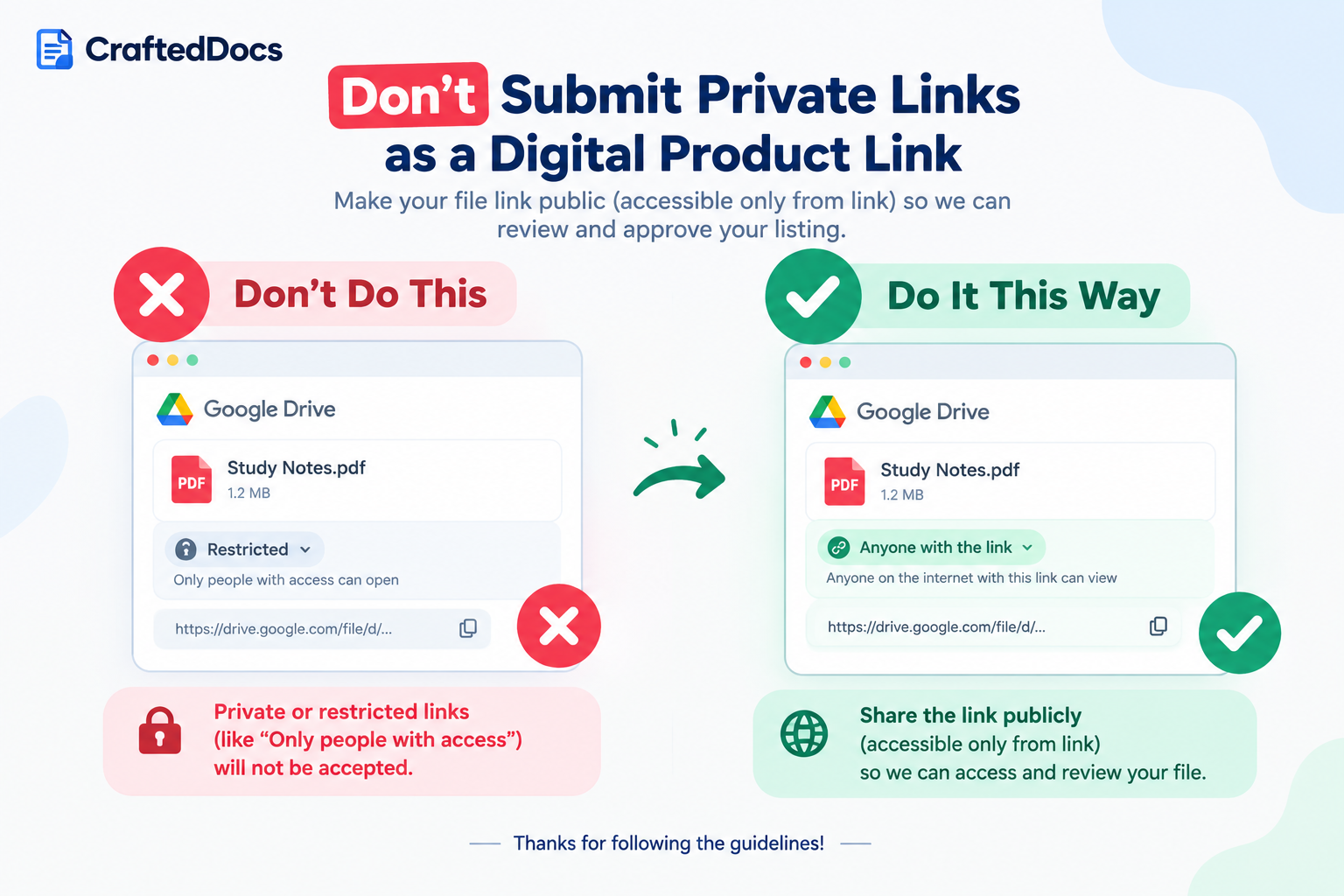
- Do not upload password-protected files without giving the password in the description or a read-me.
- Do not upload files containing viruses, macros you did not disclose, or suspicious links.
- Do not upload empty, near-empty or duplicate pages to inflate page count.
- Do not upload the same product repeatedly under different titles.
- Do not upload a scanned copy of a published textbook and call it "notes".
Part 7: Personal Information. What Never to Share
This is one of the most important sections for digital sellers. Your files will be downloaded by many people and may be shared further. Personal information left inside a file can lead to identity theft, harassment or privacy complaints, and it is a direct reason for rejection or removal.
Never Include Your Own Sensitive Information
- Home address, school or college roll number, hostel or room number
- Aadhaar, PAN, passport, driving licence, bank account, UPI ID or card details
- Personal phone number, personal email, WhatsApp number
- Photos of your face, family or ID documents in notes or screenshots
- Admit cards, marksheets or result screenshots showing your roll number, date of birth or registration number
Never Include Other People's Information
- Names, photos, phone numbers or marks of classmates, friends or teachers without written permission
- Screenshots of group chats, class WhatsApp groups or Telegram channels
- Client names, invoices, contracts or business details in templates that were copied from real work (replace with sample data)
- Student lists, attendance sheets or mark lists
Hidden Places Personal Data Can Leak
| Where It Hides | How to Check and Fix |
|---|---|
| Document properties (author, company, last saved by) | In Word, Excel and PowerPoint use File → Info → Inspect Document → Remove personal information |
| Headers, footers and watermarks | Open every page. Remove phone numbers, email and social handles |
| Comments and tracked changes | Delete all comments and accept or reject all changes before export |
| Spreadsheet hidden sheets, hidden columns and cell notes | Unhide everything, check each tab, and remove real customer or personal data |
| Phone scans and screenshots | Check the corners and margins for notifications, names, numbers and wallpaper |
| Photo metadata (EXIF location data) | Turn off location tagging on your camera and export images as new files |
| File names and folder names inside ZIPs | Rename anything containing your full name, phone number or institute |
Part 8: Copyright and Prohibited Content
Amazon removes listings that infringe intellectual property. The same applies here. You may only sell content you created or have the legal right to sell.
Allowed
- Notes you wrote or typed yourself from your own understanding
- Templates, spreadsheets and presentations you designed yourself
- Summaries written in your own words
- Content with a licence that clearly permits resale (keep proof of the licence)
Not Allowed
- Scanned or photographed pages of published textbooks, guides or NCERT books
- Leaked, pirated or "cracked" coaching modules, test series, question papers or answer keys
- Copied content from other sellers, websites, YouTube transcripts or AI output reposted without review
- Templates copied from Canva, Envato, Microsoft or other marketplaces and resold as your own
- Fonts, icons, images or music used in your product without a licence that allows commercial resale
- Fake certificates, forged documents, fake degrees or fake marksheets
- Exam cheating material, paper leaks or content that helps with impersonation
- Adult, hateful, violent, harassing or illegal content
- Malware, hacking tools or content designed to steal data
If you used a book or lecture as your source, that is fine. Write the explanation in your own words, redraw diagrams yourself, and add your own examples and mnemonics. Original structure and original wording are what make notes both legal and valuable.
Part 9: Category, Tags and Pricing
Category and Tags
- Do pick the category that truly fits your product.
- Do use relevant tags: subject, exam, format, level.
- Don't put a product in a popular category just to get more views.
- Don't add unrelated or competitor brand tags.
Pricing
- Do set a fair price in INR that reflects the amount of work and value.
- Do use coupon codes for discounts instead of changing the title.
- Don't set a price of ₹0 or ₹1 just to collect downloads, unless the platform allows free listings.
- Don't inflate a "fake original price" in the description to show a fake discount.
The Master Do and Don't Table
| ✅ Do | ❌ Don't |
|---|---|
| Write a clear, accurate title in normal case | Use ALL CAPS, emoji, symbols or keyword stuffing |
| Describe exactly what is inside the file | Promise rank, score, job or income guarantees |
| Use your own original work | Sell scanned books, leaked or pirated material |
| Use a sharp, relevant thumbnail you own | Use stolen, blurry or misleading images |
| Upload a genuine free preview | Upload a preview that differs from the product |
| Remove metadata and personal details from files | Leave phone numbers, emails, IDs or names in the file |
| Keep all communication on the platform | Add WhatsApp, Telegram or outside links |
| Test the file on phone and laptop | Upload corrupt, empty or duplicate files |
| Choose the correct category and honest tags | Use misleading categories or competitor tags |
| Use coupons for discounts | Show fake discounts or false urgency |
Pre-Submission Checklist (Copy This)
Go through every line before you press submit:
- Is my title clear, in normal capitalisation, and free of symbols, emoji and promotional words?
- Does my title include subject, exam or use, and format?
- Does my description say exactly what is inside, with page or sheet counts?
- Have I removed all phone numbers, emails, social handles and outside links from the title, description, images and file?
- Is my thumbnail sharp, at least 1000 px, and made from my own content?
- Is my preview a genuine sample that opens correctly?
- Did I open the full product file and check every page, sheet or slide?
- Did I remove document properties, comments, hidden sheets and metadata?
- Is every part of the content original or properly licensed?
- Are my category, tags and price honest and accurate?
- Does the file name look professional?
What to Do If Your Listing Is Rejected
- Read the rejection reason carefully. It usually points to one specific problem.
- Fix that issue and check the rest of the checklist as well, since reviewers may flag more than one thing.
- Edit the existing listing instead of creating a new duplicate, which can look like spam.
- Resubmit and wait for review. Do not submit the same listing repeatedly.
- Contact CraftedDocs support politely if you believe the rejection was a mistake, and include your listing name and what you changed.
Frequently Asked Questions
Why was my listing rejected even though my notes are original?
Original content is only one part of approval. Listings are also rejected for misleading titles, promotional language, contact details in the description or images, poor thumbnails, unreadable scans or personal information left in the file. Check each part of the checklist above.
Can I put my Instagram or YouTube link in my description to build followers?
No. Keep your listing free of outside links and contact details. Instead, build your audience through your CraftedDocs seller profile page and the platform tools such as coupons and sponsored listings.
Can I use my store logo on my thumbnail?
Yes, if it is your own original logo and it is small and tidy. Do not use logos of coaching institutes, publishers, colleges or other brands that you do not own.
Is it okay to sell notes that I made from a coaching class?
Only if they are your own notes written in your own words. Do not sell the coaching institute's printed material, modules, slides or recorded lecture content, even if you scanned or retyped it. That is copyright infringement.
How do I remove hidden personal information from Word, Excel and PowerPoint files?
Go to File, then Info, then Check for Issues (or Inspect Document), and choose to remove document properties and personal information. Also delete comments, unhide and review all sheets, and check headers and footers before you export.
How long does listing approval take?
Review time can vary depending on how many listings are in the queue. Clean, complete listings that follow these rules are usually reviewed faster because they need no back-and-forth.
Follow this checklist, upload your original work, and start earning 80% of every sale on CraftedDocs.
Start Selling on CraftedDocs →