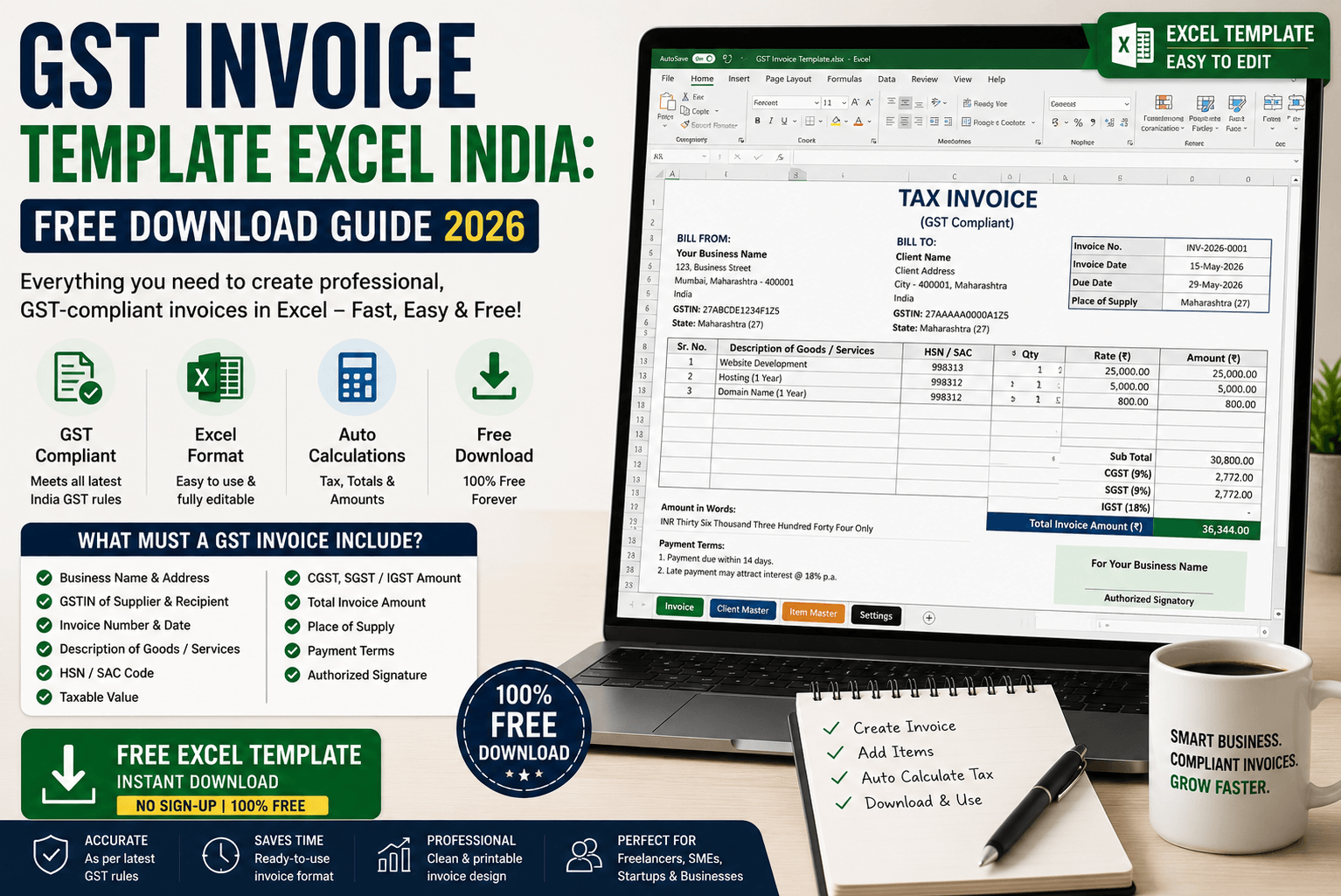
If you're a freelancer, small business owner, or trader in India, creating a GST-compliant invoice is not optional — it's the law. But designing one from scratch in Excel every time is a nightmare. That's why thousands of Indian professionals search for a GST invoice template Excel India free download every single day.
In this guide, we cover exactly what a valid GST invoice must contain, how to use a ready-made Excel template, and where you can download one instantly — or even sell your own template and earn money.
What Is a GST Invoice and Who Needs One?
A GST invoice is a document issued by a GST-registered business or individual when they supply goods or services. It serves as the legal proof of a transaction and is required for the buyer to claim Input Tax Credit (ITC).
You need to issue a GST invoice if you are:
- A GST-registered freelancer (designer, developer, writer, consultant)
- A small business or trader with GST registration
- A service provider billing another business
- An e-commerce seller registered under GST
What Must a Valid GST Invoice Include?
Under the GST Act, a tax invoice must contain specific fields. Missing even one can make it invalid for ITC purposes.
| Field | Details Required |
|---|---|
| Supplier Name and Address | Your full legal name, address, and state |
| Supplier GSTIN | Your 15-digit GST Identification Number |
| Invoice Number | Sequential, unique number for each invoice |
| Invoice Date | Date of supply or issue |
| Buyer Name and Address | Name, address, and GSTIN of the recipient (if registered) |
| HSN / SAC Code | For goods (HSN) or services (SAC) |
| Description of Goods/Services | Clear description of what was supplied |
| Quantity and Unit | For goods; not always required for services |
| Taxable Value | The amount before GST |
| GST Rate and Amount | CGST + SGST (intra-state) or IGST (inter-state), split clearly |
| Total Amount | Total payable including GST, in words and numbers |
| Signature | Authorised signatory name and signature |
Why Excel Is the Best Format for GST Invoices in India
While GST billing software exists, Excel remains the most popular choice among Indian freelancers and small businesses. Here's why:
- No subscription fees: Excel is a one-time tool most people already have.
- Fully customisable: Add your logo, change fields, adjust layout — it's all yours.
- Auto-calculation: Formulas automatically calculate CGST, SGST, IGST, and totals.
- Easy to save as PDF: One click to convert your invoice into a professional PDF to send clients.
- Works offline: No internet required — critical for freelancers in areas with unreliable connectivity.
A good GST Excel template includes a dropdown to switch between CGST+SGST (intra-state) and IGST (inter-state) automatically. This saves you from manually changing tax fields for different clients.
What a Good GST Invoice Excel Template Should Have
Not all templates you find online are actually GST-compliant. Here's what to check before using any template:
- All mandatory GST fields pre-built (see table above)
- Auto-calculation of tax amounts — no manual entry errors
- Support for both CGST/SGST and IGST scenarios
- Invoice number auto-increment or easy manual entry
- Space for your business logo
- Amount in words (as required by GST rules)
- Bank details section for payment
- Clean, professional layout that looks good when printed or saved as PDF
CGST vs SGST vs IGST — Quick Reference
| Transaction Type | Tax Applied | Example |
|---|---|---|
| Supplier and buyer in same state | CGST + SGST (split equally) | Delhi freelancer billing Delhi client |
| Supplier and buyer in different states | IGST (full rate) | Mumbai freelancer billing Bangalore client |
Download a GST Invoice Template Excel on CraftedDocs
CraftedDocs is India's digital file marketplace where professionals upload and sell ready-to-use templates — including GST invoice Excel files built specifically for Indian freelancers and small businesses.
Why download from CraftedDocs instead of random websites:
- Free preview: See exactly what the template looks like before downloading
- Made for India: Templates include INR formatting, CGST/SGST/IGST fields, and Indian business layouts
- Instant download: No signup required — guest checkout available
- Trusted sellers: Verified badges so you know who made the template
- Permanent access: Re-download any time from your dashboard
Are You an Accountant or Freelancer? Sell Your GST Template
If you've built a well-structured GST invoice template — whether for freelancers, traders, or service businesses — you can sell it on CraftedDocs and earn passively. Thousands of Indian professionals are searching for exactly this every month.
- Create a free seller account at crafteddocs.com
- Upload your Excel (.xlsx) template
- Write a clear description — mention GST compliance, auto-calculation, CGST/IGST support
- Upload a screenshot or PDF preview
- Set your price and earn 80% of every sale paid to your UPI or bank
GST templates that support multiple business types — freelancer services, product sales, and mixed supply — sell significantly better than single-use templates. Build one template that covers all three scenarios and you'll attract a much wider audience.
Frequently Asked Questions
Is an Excel GST invoice legally valid in India?
Yes — GST law does not mandate any specific software or format. As long as your invoice contains all mandatory fields required under the GST Act, an Excel-generated invoice is fully valid and legally compliant.
Do I need to register on GST portal to use an Excel invoice template?
You need a GSTIN (GST registration number) to issue a GST invoice — but the template itself can be downloaded and set up before registration. Once you have your GSTIN, just fill it into the template and you're ready.
What GST rate applies to freelance services in India?
Most freelance services in India attract 18% GST. This is split as 9% CGST + 9% SGST for intra-state transactions, or 18% IGST for inter-state transactions. A good Excel template handles this split automatically.
Can I customise a downloaded GST invoice template for my business?
Absolutely — Excel templates are fully editable. Add your logo, change your business name and address, adjust the layout, and save it as your own master invoice file. Most templates on CraftedDocs are designed to be easily customised.
How do I convert my Excel GST invoice to PDF before sending to clients?
In Excel, go to File → Save As → choose PDF format, or use File → Export → Create PDF. This gives you a clean, professional PDF that clients can open on any device without needing Excel.
India-ready GST invoice Excel templates made by professionals — instant download, free preview, no subscription needed.
Browse Templates on CraftedDocs →