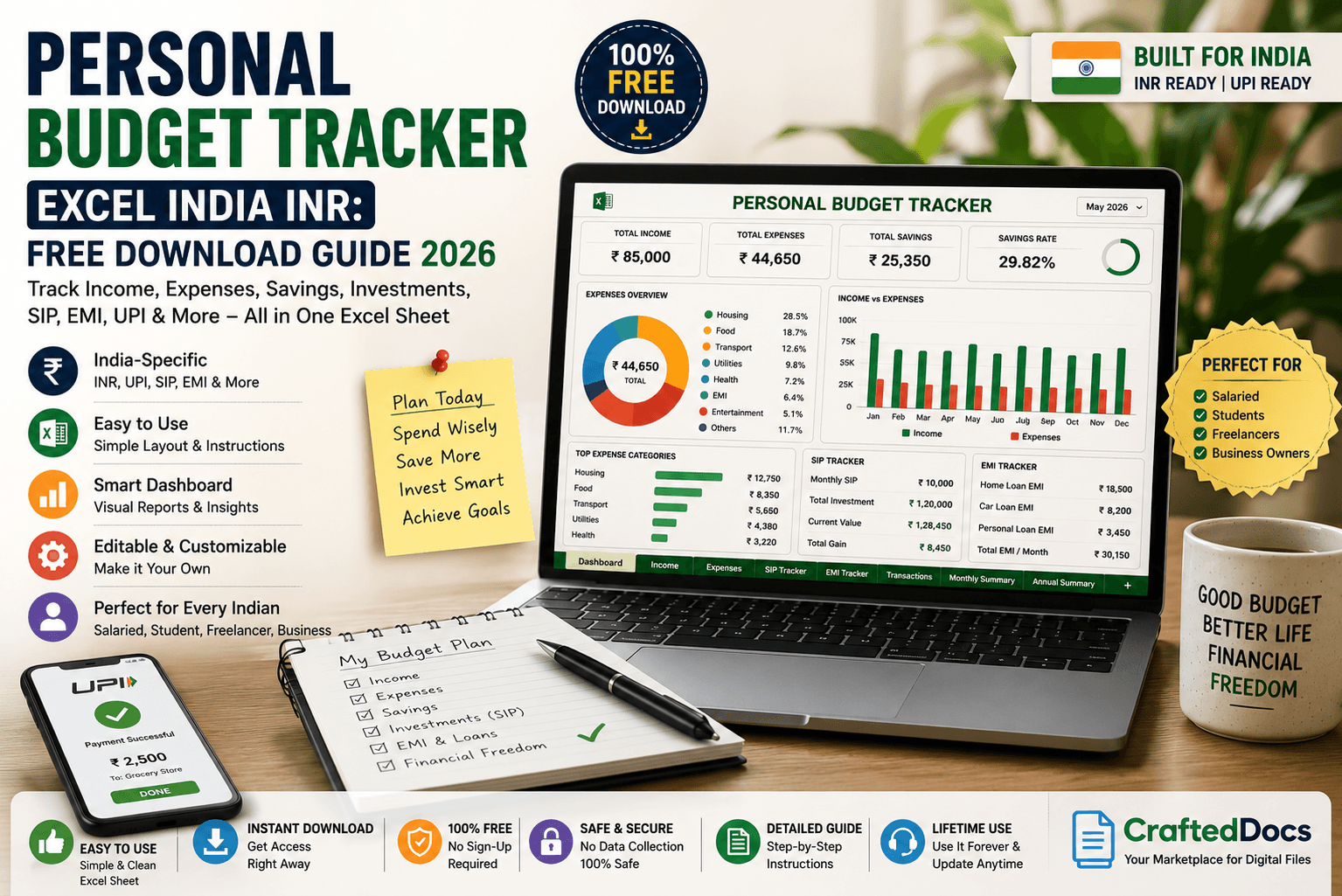
Most personal budget templates you find online are built for Americans. They track dollars, mention 401(k)s, and have no idea what a SIP, EMI, or UPI expense even is. For Indian households and young professionals, these templates are useless.
What Indian earners actually need is a personal budget tracker in Excel built for INR — one that understands how we spend, save, and invest in India. In this guide, we'll cover what a good India-specific budget tracker must include and where to download one instantly.
Why Generic Budget Templates Don't Work for Indians
Here's what most downloaded budget templates get wrong for Indian users:
- Currency set to $ instead of ₹ — requires manual change throughout
- No UPI or digital payment category — the most common payment method in India
- No EMI tracking section — critical for the millions with home, car, or personal loans
- No SIP or mutual fund investment column — the most popular investment vehicle for salaried Indians
- No PPF, NPS, or LIC tracking — standard Indian tax-saving instruments
- Expense categories built for Western lifestyles — no domestic help, no auto/cab, no recharge expenses
A budget tracker built specifically for India should include a separate tab for tax-saving investments (Section 80C, 80D) so you can track your annual tax liability alongside monthly expenses.
What a Good Personal Budget Tracker Excel (India) Must Have
Here's exactly what to look for when downloading or building an India-specific budget tracker:
1. Income Section
- Monthly salary (in-hand, post TDS)
- Freelance or side income
- Rental income
- Investment returns (dividends, interest)
2. Fixed Monthly Expenses
- Rent or home loan EMI
- Car or two-wheeler loan EMI
- Personal loan EMI
- SIPs and recurring deposits
- Insurance premiums (health, term, LIC)
- Mobile and broadband recharge
- OTT subscriptions (Netflix, Hotstar, etc.)
3. Variable Monthly Expenses
- Groceries and vegetables
- Eating out and Swiggy/Zomato orders
- Auto, Ola, Uber, and petrol
- Domestic help and cook salary
- Electricity and water bills
- Medical expenses
- Shopping — clothes, electronics, household
- Entertainment and outings
4. Savings and Investment Tracker
- Monthly SIP amount and fund name
- PPF contribution
- Fixed deposit additions
- Emergency fund balance
- Total savings rate (% of income)
5. Dashboard and Summary
- Income vs expense bar chart
- Monthly savings amount and savings rate
- Category-wise spending breakdown (pie chart)
- Month-over-month comparison
| Feature | Basic Template | India-Specific Template |
|---|---|---|
| Currency | $ (USD) | ₹ (INR) |
| EMI tracking | ❌ | ✅ |
| SIP tracking | ❌ | ✅ |
| UPI category | ❌ | ✅ |
| Tax-saving tracker (80C) | ❌ | ✅ |
| Domestic help expense | ❌ | ✅ |
How to Use a Budget Tracker Excel Effectively
Step 1: Set It Up Once
Enter your fixed monthly expenses — rent, EMIs, SIPs, insurance — at the start of each month. These don't change, so fill them in once and the sheet handles the rest.
Step 2: Log Variable Expenses Weekly
Don't try to remember expenses at month-end. Set a habit of logging expenses every Sunday — it takes 10 minutes and keeps your data accurate.
Step 3: Review the Dashboard Monthly
At the end of each month, look at your category breakdown. Most people discover they're spending 3x more on food delivery than they thought. The data makes the problem visible — which is the first step to fixing it.
Step 4: Set a Savings Rate Target
Aim to save at least 20% of your in-hand income. Use your budget tracker to see your actual savings rate each month and adjust spending categories accordingly.
The best habit upgrade: link your UPI app's monthly spending summary to your Excel tracker. PhonePe and Google Pay both provide monthly category breakdowns — copy those numbers into your tracker at month-end instead of logging every transaction individually.
Download a Personal Budget Tracker Excel (India INR) on CraftedDocs
CraftedDocs is India's digital file marketplace where finance-savvy creators upload India-specific Excel templates — including personal budget trackers built for INR, UPI, SIP, and EMI tracking.
- Built for India: INR formatting, Indian expense categories, tax-saving sections
- Free preview: See the template before downloading
- Instant download: No account needed — guest checkout available
- Permanent access: Re-download from your dashboard any time
- Trusted sellers: Verified badge system to identify reliable creators
Finance-Savvy? Sell Your Budget Template and Earn
If you've built a solid India-specific budget tracker — with INR, SIP tracking, and a clean dashboard — thousands of Indians are searching for exactly this every month. You can list it on CraftedDocs and earn 80% of every sale.
- Create a free seller account at crafteddocs.com
- Upload your Excel (.xlsx) file
- Add a PDF or image preview showing the dashboard and key tabs
- Write a description mentioning INR, SIP, EMI, UPI — these are the search terms buyers use
- Set your price and start earning — 80% goes directly to your UPI or bank
Budget tracker templates that include a separate annual summary tab — showing 12-month income vs expense trends — are among the highest-rated financial templates on CraftedDocs. That one extra tab adds significant perceived value.
Frequently Asked Questions
Is Excel better than budget apps like Walnut or Money Manager for tracking?
Apps are more convenient for logging real-time transactions. But Excel gives you full control — custom categories, investment tracking, tax planning, and charts you can share or print. Many Indians use both: apps for daily logging and Excel for monthly analysis and planning.
Can I use Google Sheets instead of Excel for budget tracking?
Yes — most Excel budget templates work in Google Sheets with minor adjustments. Google Sheets also lets you access your budget from any device and share it with your spouse or family for joint budgeting.
What should my monthly savings rate be as an Indian salaried professional?
Financial planners generally recommend saving at least 20% of your in-hand income. If you have specific goals (home down payment, early retirement), you may need to target 30–40%. Your budget tracker will show you your actual rate so you can see the gap clearly.
How do I track SIP investments in a budget tracker?
Include a dedicated Investments tab with columns for fund name, monthly SIP amount, start date, and current value. Log SIP deductions as a fixed expense in the monthly sheet, and update the portfolio value quarterly in the Investments tab.
Can a budget tracker Excel help me save for a specific goal in India?
Absolutely. A good India-specific budget tracker includes a goal-based savings calculator — enter your target amount, timeline, and expected return, and it shows you the monthly savings needed. Common goals include house down payment, wedding fund, car purchase, and emergency corpus.
INR-ready, SIP and EMI tracking included. India's only student-and-professional marketplace for financial Excel templates.
Browse Budget Templates →